

To view the subjects by section/plan enter the required data into the filter.
- choose a faculty from the list
- consequently choose the required section/plan from the list or press Show to display a list of all sections/plans defined for the chosen faculty - see the following picture
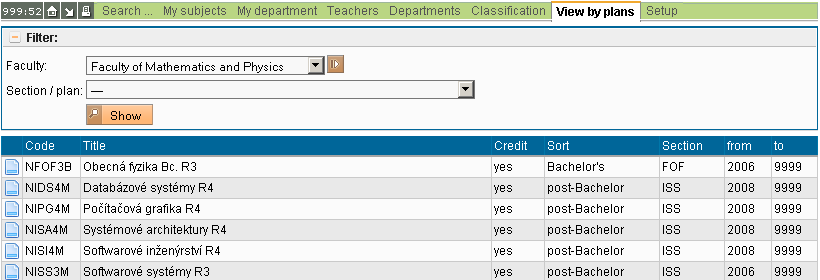
Clicking on  , clicking on the code of a plan or choosing a section/plan in the filter, displays a table of subjects belonging to the chosen section/plan.
, clicking on the code of a plan or choosing a section/plan in the filter, displays a table of subjects belonging to the chosen section/plan.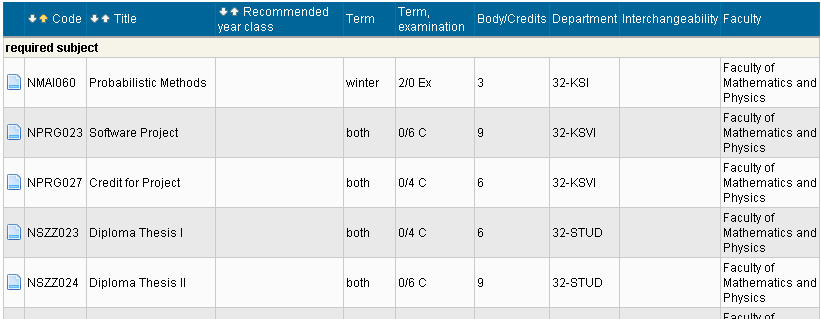
Meaning of the columns:
- - clicking on this icon displays Details of the subject
- Code - a code of the subject - clicking on the code displays Details of the subject
- Title - a title of the subject - clicking on the title displays Details of the subject
- Term - in which term the subject is taught
- Term, examination - number of hours per week of lectures and practicals + way of examination
- Department - the department guaranteeing the subject - clicking on the department's name displays a list of all subjects of the Department
- Faculty
The subjects printed in gray are not taught in the chosen academic year!
The table can be sorted by the code, by term or by the title of the subject using the icons  .
.
.